Cloudways vs Self-Hosting WordPress: A Practical Perspective for 2026
If you’ve ever tried to host WordPress “the right way,” you know it’s both promising and challenging. Cloud hosting offers control, scalability, and performance, but managing WordPress on your own cloud infrastructure can quickly become a demanding, ongoing responsibility—even for those with technical experience.
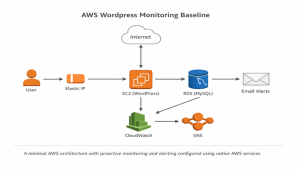
I’ve personally set up a WordPress site using AWS components like EC2 and RDS, handling everything manually to see what’s truly involved. The process was enlightening, sometimes frustrating, and ultimately helped clarify what matters most.
That’s why I took a closer look at Cloudways—not as a shortcut, but as a strategic alternative. In this post, I’ll explain what Cloudways is, how it compares to self-hosting, who it’s best suited for, and why it makes sense for many people in 2026.
Who Should Read This?
This guide is especially useful if you’re:
- A blogger, creator, or solo entrepreneur
- A small business owner running WordPress
- A developer who can self-host but prefers not to
- Someone outgrowing shared hosting
- Curious about cloud hosting but overwhelmed by AWS or GCP
If you enjoy managing servers and infrastructure for its own sake, Cloudways may not be for you. But if you want reliable performance and scalability without constant troubleshooting, keep reading.
The Reality of Self-Hosting WordPress
Let’s be honest: self-hosting WordPress on cloud infrastructure gives you full control, flexibility, and plenty of opportunities to learn. But it also means you’re responsible for security, updates, backups, monitoring, and fixing anything that goes wrong.
Even with a straightforward setup—like a single EC2 instance and an RDS database—there’s a long checklist to manage. Missing a single detail can take your site offline. In my case, a database credential rotation led to unexpected downtime, simply because everything depended on manual coordination.
What You’re Responsible For
Here’s a sample of what you’ll need to handle:
- Server provisioning
- Web server configuration (Nginx/Apache)
- PHP compatibility
- Database connectivity
- Secrets management
- SSL certificates
- Firewall rules
- Monitoring and alerts
- Backups and restores
- Cost management
- Security hardening
- Incident response
It’s a lot to juggle, and the margin for error is slim.
What Is Cloudways?
Cloudways is a managed cloud hosting platform that sits between you and major cloud providers like DigitalOcean, AWS, Google Cloud, Vultr, and Linode. Instead of managing servers directly, Cloudways provides:
- A managed control panel
- Optimized WordPress stack
- Built-in security, backups, and monitoring
- One-click scaling
- Server-level caching
- SSL and DNS tools
You still benefit from cloud performance, but without the need to live in the terminal. Think of Cloudways as managed infrastructure without the compromises of shared hosting.
Cloudways vs Shared Hosting
It’s important to note that Cloudways is not shared hosting. With shared hosting, resources are split among hundreds of sites, configuration is limited, and performance suffers under load. Cloudways, on the other hand, offers dedicated resources, modern caching, SSD storage, vertical scaling, and much better isolation. You’re paying for real infrastructure, minus the operational overhead.
Cloudways vs Self-Hosting: Key Differences
Control:
Self-hosting gives you complete control. Cloudways offers high-level control but limits deep OS access. If you need to customize kernel parameters or the operating system, self-hosting is the way to go—but most WordPress sites don’t require that level of customization.
Maintenance:
With self-hosting, you handle everything. Cloudways manages most maintenance tasks, which is a major advantage.
Security:
Self-hosting means designing and maintaining your own security. Cloudways includes built-in firewalls, patching, and monitoring. Security is often an underestimated cost of self-hosting.
Backups:
You’re responsible for configuring and testing backups when you self-host. Cloudways provides automated backups, which become invaluable when you need them.
Monitoring & Alerts:
Self-hosting requires building your own monitoring system. Cloudways offers built-in dashboards, so you don’t need to set up third-party alerting tools unless you want to.
Cost Transparency:
Self-hosting can be inexpensive, but costs can spiral. Cloudways offers predictable monthly pricing. It’s not always the cheapest, but it’s the least surprising.
When Cloudways Makes Sense
Cloudways is a strong fit if:
- You want better performance than shared hosting
- You don’t want to manage servers full-time
- Your site is important to your income or brand
- You want scalable infrastructure without re-architecting
- You value uptime and peace of mind
It’s especially useful if WordPress is a means to an end, not the main project.
When Cloudways Might Not Be Right
Cloudways may not be ideal if:
- You’re learning cloud infrastructure for career growth
- You need full OS-level customization
- You enjoy infrastructure management
- Your site has highly specialized requirements
If you want to learn AWS deeply, self-hosting is still valuable—just be prepared for some friction.
Performance Without Complexity
One of Cloudways’ biggest benefits is built-in performance optimization. You get server-level caching, optional Redis, CDN integrations, PHP version management, and an optimized Nginx + PHP-FPM stack. These are features many WordPress sites should have, but often lack when self-hosted.
Cost Awareness in 2026
Cloudways stands out for cost clarity. With self-hosting, costs are spread across services, bills lag behind usage, and spikes can surprise you. Cloudways offers flat monthly pricing, easy scaling, and no surprise line items. Is it cheaper than AWS at the lowest scale? Sometimes no. Is it cheaper than downtime, stress, and lost time? Often yes.
Lessons Learned from Self-Hosting
A few takeaways from running WordPress directly on cloud infrastructure:
- Everything works until something doesn’t
- Monitoring is useless if alerts don’t reach you
- Secrets rotation requires coordination
- Downtime is rarely caused by one big mistake
- Operational overhead adds up quietly
These lessons are exactly why managed platforms like Cloudways exist.
Why Both Approaches Matter
While I recommend Cloudways for many use cases, I don’t regret self-hosting WordPress. Understanding how cloud components interact, how WordPress connects to databases, and where failures can occur makes you a better site owner—even on managed platforms. Cloudways isn’t about ignoring the technical side; it’s about delegating intentionally.
Final Recommendation
If your goal is writing, creating, building a brand, running a business, or publishing content consistently, Cloudways is a solid, pragmatic choice in 2026.
If you want to learn cloud infrastructure deeply, build platform-level skills, or experiment with architecture, self-hosting still has value—just go in with eyes open.
Interested in Cloudways?
If you’re ready to move beyond shared hosting without turning WordPress into a second job, Cloudways is worth exploring. Click here to Get Started with Cloudways.
Affiliate disclosure: If you sign up through this link, I may earn a commission at no extra cost to you.