My Beginner-Friendly Cloud Portfolio Stack (What I’m Building + Why)
Disclosure: This post may contain affiliate links, which means I may earn a commission if you purchase through my links at no extra cost to you.
There’s something different about building something that’s actually live.
Not “I’m learning,” not “I’m planning,” not “I’ll get to it when I have time.”
I mean, it exists. It’s running. It’s public. And it’s proof.
That’s what this site is for me. It’s a blog, yes — but it’s also a portfolio, a business foundation, and a real-time record of me leveling up (again) in the most practical way possible: by shipping.
If you’re reading this, you’re catching me at the beginning of the build. And I’m intentionally keeping it simple enough to move fast… while still building it with the security and “grown-up cloud” habits that actually matter.
Why I’m building this (the honest version)
I want a space where I can write, teach, and document what I’m learning — without waiting for permission. I also want my work to speak for itself when I’m networking, interviewing, or pitching services.
And yes… I want this to monetize.
Not in a gimmicky way. More like: if I’m already using tools and platforms that help me build, organize, and grow — I should be able to recommend them and earn from them. That’s fair. That’s sustainable. And it helps fund the bigger vision.
This website is the “single point of truth” for all of that:
- My cloud builds
- My career insights (Customer Success, SaaS, outcomes, strategy)
- my real – life moments (because rest and reset are part of the system too)
- and eventually, the consulting/business side as it grows
What I’m building right now (the stack, in plain English)
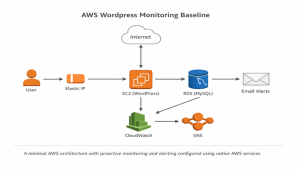
I’m starting with a stack that’s beginner-friendly but still follows best practices. The goal is reliability first, then performance and upgrades over time.
Here’s what’s powering this site today:
✅ Domain + DNS
I’m using my domain toyatalksaboutit.com and pointing it to my hosting using DNS records. It’s simple, but it’s the first “real-world” step that makes a site feel legitimate.
✅ Compute: EC2 (the server)
This is the actual machine running WordPress. It’s where the website lives.
✅ Database: RDS (managed MySQL)
Instead of putting the database on the server (which is common but messy in the long term), I’m using a managed database service. That gives me better reliability and backup options from day one.
✅ Nginx + PHP-FPM (web server)
This is what serves the site pages and runs WordPress. It’s fast, lightweight, and widely used.
✅ HTTPS (Let’s Encrypt)
This is non-negotiable for me. If the site isn’t secure, it won’t go live.
So yes, this site is running on HTTPS with a free certificate, and HTTP redirects to HTTPS.
What I’m prioritizing (because “live” isn’t enough)
Going live is step one. Going live securely and maintainably is the goal.
Here’s what I’m prioritizing as I build:
1) Security basics (the boring stuff that saves you later)
- least privilege access
- clean credentials handling
- updates/patches
- tight security group rules
- no “mystery ports” left open
2) Backups (because I’m not doing heartbreak)
If I can’t restore my site quickly, I don’t consider it “real.” Backups are part of the build, not an afterthought.
3) Performance (fast enough now, optimized later)
I’m not trying to perfect everything on day one. But I am building with a plan:
- caching (basic first)
- image optimization
- CDN later if needed
- tightening the config as traffic grows
The tools I’m using (and why I actually like them)
This section will grow over time, but these are a few tools that make building (and maintaining) easier.
🧩 Site + business essentials
- A backup plugin (so I can restore quickly if something breaks)
- A link manager (so I can clean up affiliate links and track clicks)
- A contact form plugin (because collaboration opportunities matter)
🔒 Security + sanity
- A password manager (because no one is memorizing complex creds in 2026)
- Uptime monitoring (so I know if my site goes down before someone DM’s me)
I’ll link my exact tools once my Pretty Links setup is fully organized — but I wanted to share the approach early because this is the part people skip.
A quick “lifestyle reset” moment (because this is the real system)
I’m not building this site from a perfect place.
Sometimes this is me at the desk with a notebook, a cup of tea, and a calm house.
Sometimes it’s me building in the middle of a chaotic day, tired but determined, because I refuse to let momentum die.
I’ve learned that the “soft life” isn’t just aesthetics — it’s infrastructure too.
It’s routines, boundaries, and doing the work in a way that doesn’t burn you out.
So yes… I’ll be sharing those moments here too. Because the goal isn’t just to build a site.
It’s to build a life and a career where I’m in control.
What’s next (the roadmap)
Here’s what I’m doing next, in order:
- Finish WordPress setup + clean admin access
- Backups + restore testing
- Basic caching + speed improvements
- A simple theme + homepage layout
- My first content series (cloud builds + career frameworks)
And then I’m writing. Consistently.
If you’re building too…
Bookmark this and check back — I’ll keep updating this stack as I improve it and as the site grows.
And if you’re in a season of rebuilding, rebranding, or re-leveling… I see you. Let’s do it anyway.